Tools
Because every framework needs a ton of different companion tools
Special K Injection Frontend (SKIF)
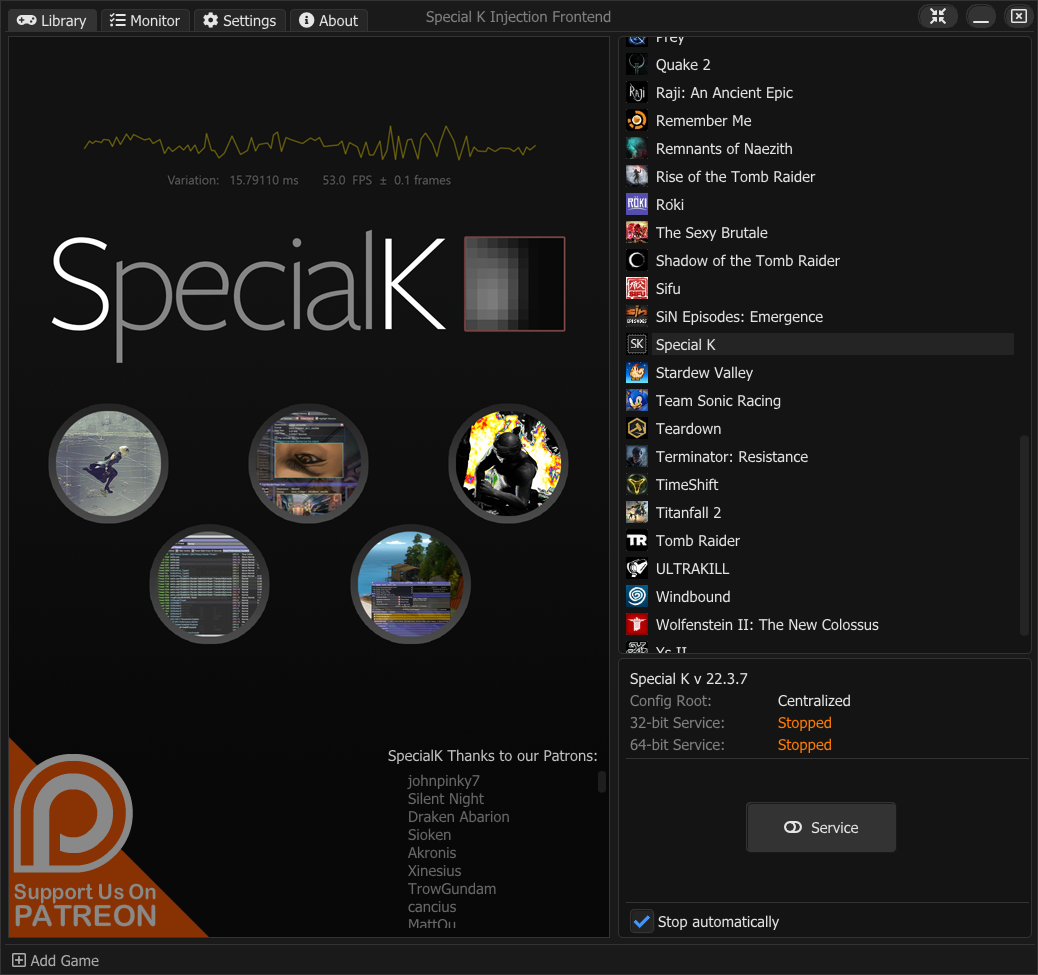
Special K Injection Frontend (SKIF) is the new frontend that began development in late 2019 and is used to manage Special K across all games. It is bundled within the Special K installer and is updated alongside Special K.
Features:
- Lists Epic, GOG, Steam, and Xbox games.
- Supports custom games to easily inject Special K in games from other platforms.
- Automatically starts and stops the injection service when launching a game through the app.
- Features high resolution game covers, as well as the option to set custom cover for games.
- Features quick links to usable resources such as PGGamingWiki, SteamGridDB for custom covers, and SteamDB/GOG Database for technical data on games on said platforms.
- Can act in a launcher capacity for Steam games using the
SKIF %COMMAND%launch option to quickly inject Special K into Steam games even when launched through the Steam client itself.
Command line arguments
| Argument | What it does |
|---|---|
<empty> |
Launches SKIF. |
Start |
Launches SKIF and starts an instance of the injection service. |
Temp |
Used with Start to indicate the injection service should auto-stop after a successful injection. |
Stop |
Stops running instances of the injection service. Can also be used to attempt to force-eject leftover injections of Special K. |
Quit |
Closes running instances of SKIF. |
Minimize |
Launches SKIF minimized or minimizes any running instances of SKIF, to the taskbar or notification area depending on configuration. |
"<path>.exe" |
Uses SKIF as a launcher to start the injection service, launch another application, and then stop the service. Any arguments specified after the path is proxied to the launched application. Called through SKIF %COMMAND% from within the Steam client. |
AddGame="<path>" |
Experimental! Adds the specified application to the library of SKIF as a custom game. |
RestartDisplDrv |
Requires elevation! Restarts the display driver (useful as this can sometimes fix MPOs). |
Plugins (load external DLLs)
Special K supports making use of various third-party utilities as well. These are typically stored in Special K\ThirdParty\ or in the game folder for local installs.
dgVoodoo 2
Special K can automatically make use of dgVoodoo 2 to extend its supported render APIs to include Direct3D 2-8 and DirectDraw.
ReShade
Special K can load ReShade through its plugin system, which often have a higher compatibility than loading ReShade through alternative methods.
Custom plugin
Please note that compatibility with every single third-party DLL mod can not be guaranteed.
This may require trying multiple load-orders (refer to Steps 3 and 4 below).
Users can also specify a custom plugin that Special K will attempt to load alongside itself.
-
Open the game-specific config.
-
Add the following to the bottom of the file:
[Import.NameOfPlugin]
Architecture=Win32/x64 (should match the DLL file and the game itself)
Role=ThirdParty
When=Early/PlugIn/Lazy
Filename=<Relative or absolute path to mod file>
Example 1: Using ReShade in a 64-bit game (Traditional explicitly defined Role and Architecture):
[Import.ReShade64]
Architecture=x64
Role=ThirdParty
When=PlugIn
Filename=C:\Program Files\Special K\PlugIns\ThirdParty\ReShade\ReShade64.dll
Example 2: Using DXVK while SK is already dxgi.dll (Simplified 24.5.27.1+ Config -- Role and Architecture are optional):
[Import.DXVK_dxgi] Role=dxgi When=Proxy Filename=C:\Program Files\Special K\PlugIns\ThirdParty\dxvk\x64\dxgi.dll [Import.DXVK_d3d11] When=Early Filename=C:\Program Files\Special K\PlugIns\ThirdParty\dxvk\x64\d3d11.dll -
Launch the game and see if the third-party mod is loaded in. If it doesn't load try changing the When property.
-
If "Early" load-order is needed, installing the local wrapper of Special K for the game will ensure the plug-in is loaded as early as possible.
List of properties and their possible values:
| Property | Value | Description | ||
|---|---|---|---|---|
| Architecture | x64 Win32 *Any |
Special K will ignore this DLL if the current executable's architecture does not match. The Architecture field is intended to alleviate problems with games that have multiple launch configurations (i.e. a game has the original DOSBox version as well as a modern 64-bit port), so that the correct version of a plug-in is loaded.
|
||
| Role | ThirdParty *Any |
Third-party (non-Special K) DLL files.
|
||
| Role | dxgi d3d11 d3d9 OpenGL32 |
For use with When=Proxy to use a custom DLL instead of the Windows system DLL of the same name.
|
||
| When | Early PlugIn Lazy Late Proxy |
Load time for the plugin, from Early (before Special K) -> PlugIn -> Lazy/Late. Loading before Special K (Early) means that any effects or changes made by the plugin will be applied to Special K as well. Proxy is used to proxy everything through another plug-in that wants to be one of the following DLL files: dxgi.dll, d3d11.dll, d3d9.dll, OpenGL32.dll |
||
| Filename | Relative Path Absolute Path |
Path to the DLL file to load. v22.06.15 and newer also supports expanding environment variables (i.e. %LocalAppData%\Steam\ValvePlug.dll). |
List of special properties:
| Property | Value | Description | |
|---|---|---|---|
| Blacklist | Filename(s) | Optional comma separated list of executable filenames for which the plugin should be ignored, (e.g. Blacklist=Atelier_Ryza_Launcher.exe,Atelier_Ryza_Env.exe) |
|
| Mode | Normal Compatibility |
Optional parameter controls whether SK will use ReShade 6.0+ in Add-On mode ("Normal") or Compatibility mode ("Compatibility" or unspecified / blank).
|
Extended hardware monitoring driver
Special K can make use of the common WinRing0x64.sys kernel driver to enable advanced CPU hardware monitoring capabilities in its CPU widget. This is redistributed through a separate installer from the main Special K/SKIF package, with the installer creating a driver service on the system called SK_WinRing0 that autostarts the driver alongside the system boot as this is required to allow unelevated games to make use of it.
Security concerns
The package exposes the system to CVE-2020-14979 (details), a Local Privilege Escalation vulnerability that can be exploited by malicious third-party code running locally to elevate their privileges to that of a local administrator.
This is a consequence of the intended purpose of allowing advanced CPU hardware monitoring capabilities in regular games that typically run unelevated (not as an admin), and our dependency on the WinRing0_1_2_0 kernel driver. While Special K's custom user-mode driver is cut-down significantly and only implements the relevant CPU sensor code, the kernel driver itself includes more advanced hardware capabilities beyond that, meaning third-party apps/tools that make use of their own user-mode driver can also make use of those capabilities as a result.
This is sadly nothing we can solve as it is outside of our financial capabilities to create a cut-down custom kernel driver implementing only the CPU sensor capabilities.
If you are a corporate/business user or IT administrator on a corporate device, do not under any circumstances install this driver!
For regular end-users, whether this is a concern for you or not is ultimately up to you. To be able to exploit the vulnerability, any malicious code would need to be executed locally and go undetected by the anti-virus suite of the system, and at that point most malware can already perform similar local privilege escalations easily through alternate methods, such as through e.g. a simple UAC auto-elevation bypass.
Playnite extension: Special K Helper
The user darklinkpower has created an extension for Playnite called Special K Helper that allows using and managing Special K for games through the Playnite library. The extension can be installed from the addons browser within Playnite, or through this Playnite link.
Spodi's Scripts
Special K Starter Script (SKSS)
SKSS is a powershell script written by Spodi to start and stop Global Injection alongside an Application.
It can be used to launch a portable installation of Special K, allowing you to run Global Injection from custom paths and with different versions.
SKSS also provides the option to start the service with Administrator privileges, even with an unelevated instance already running.
This can be useful when you want to run a specific version of Special K for a game, without changing the version used by SKIF.
Download: Spodi's Repository on Github (SKSS).
Special K Local Updater (SKLU)
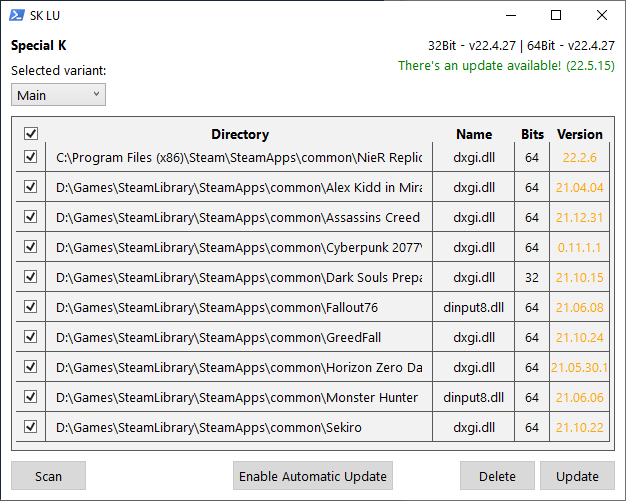
SKLU is a powershell script to update Local Injections present on your system.
This script scans all game folders known by SKIF and gives the option to replace any local Special K DLLs found with the ones in Special Ks default install location.
SKLU is a collaborative effort between Spodi and Wall_SoGB.
Download: Spodi's Repository on Github (SKLU).
Steam Input Disabler (Valve Plug)
Valve Plug is a XInput1_4.dll based drop-in patch to the Steam client to deny it access to input devices using the XInput API and any API that opens handles to HID devices, disabling the Steam Input feature and all related functionality.
This patch was created because the built-in options of the Steam client labeled "Off" give end-users the illusion of control when in reality none of them, or any combination thereof, allows the user to fully disable Steam Input and its various device enumeration and initialization code.
To uninstall simply run the uninstaller from the Installed Apps section in Windows, or by removing the XInput1_4.dll from your Steam client's install directory.
Misc tools
The following are miscellaneous tools related to Special K that might be of use for some.
Special K Install Manager (SKIM)
This version has not been updated further than to v0.10.2.1 dated June 20, 2019 and is no longer fully functioning as of 2021 due to changes in Steam's library format.
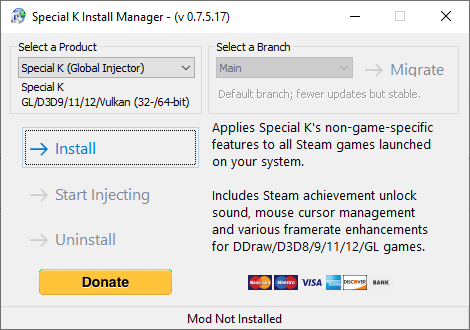
Special K Install Manager (SKIM) is the old frontend used and distributed before the Steam version of Special K was introduced. SKIM supports toggling global injection, automated install of some game-specific mods, as well as managing additional modules for some of the game-specific mods -- a function not yet seen in SKIF.
While SKIM can still be used to install and manage older game-specific Special K-based mods such as TBFix, FAR, etc, it otherwise sees no continued development or maintenance.
- Download and run the following installer;
Disable autostart with Windows
SKIM makes use of a shortcut in shell:startup to achieve autostarting functionality. This task can be disabled in various ways:
- Run SKIM and right-click on its icon in the notification area of Windows besides the system clock. Untick the
Start With Windowsoption. - Open the Run window of Windows by utilizing the ⊞ Win+R hotkey. Type in
shell:startupand click on OK. In the folder that opens, remove theSKIM64shortcut.
SK_UninstallScript
This script is outdated as of 2023 as it have not been updated to reflect Special K's modern install paths or components.
SK_UninstallScript is a basic PowerShell based uninstall script that automatically terminates the global injector service and removes autostart entries for both SKIF and the legacy SKIM based injection frontend.
This can be used as a helper tool for troubleshooting purposes.
Previous versions of Special K
The following are the previous versions of Special K available for download. Versions handled through the Steam platform (0.11.0.0–0.11.0.44) are not available,[1] nor are versions older than v0.8.11.[2]
| Version | Description | Release notes | Archive | Installer |
|---|---|---|---|---|
| Stable | Latest public "stable" version; usually a few months old. Currently v 23.6.15.2. | Release notes | Download | Download |
| Experimental | Latest test version. Change update channel in SKIF to Discord (updates regularly) |
Release notes | Discord | Discord |
| 23.6.15.2 | Release notes | N/A | Installer | |
| 23.6.13.3 | Release notes | N/A | Installer | |
| 23.6.12 | Release notes | N/A | Installer | |
| 23.6.11.3 | Release notes | N/A | Installer | |
| 23.6.11.2 | Release notes | N/A | Installer | |
| 23.6.11.1 | Release notes | N/A | Installer | |
| 23.6.11 | Release notes | N/A | Installer | |
| 23.6.10 | Release notes | N/A | Installer | |
| 23.6.9.2 | Release notes | N/A | Installer | |
| 23.6.7 | Release notes | N/A | Installer | |
| 23.6.5 | Release notes | N/A | Installer | |
| 23.6.5 | Release notes | N/A | Installer | |
| 23.6.3.2 | Release notes | N/A | Installer | |
| 23.6.3.1 | Release notes | N/A | Installer | |
| 23.6.3 | Release notes | N/A | Installer | |
| 23.6.2.2 | Release notes | N/A | Installer | |
| 23.6.2.1 | Release notes | N/A | Installer | |
| 23.6.2 | Release notes | N/A | Installer | |
| 23.6.1 | Release notes | N/A | Installer | |
| 23.5.31 | Release notes | N/A | Installer | |
| 23.5.30.2 | Release notes | N/A | Installer | |
| 23.5.30 | Release notes | N/A | Installer | |
| 23.5.27.2 | Release notes | N/A | Installer | |
| 23.5.27.1 | Release notes | N/A | Installer | |
| 23.5.26.1 | Release notes | N/A | Installer | |
| 23.5.24 | Release notes | N/A | Installer | |
| 23.5.19 | Release notes | N/A | Installer | |
| 23.5.18 | Release notes | N/A | Installer | |
| 23.5.13.1 | Release notes | N/A | Installer | |
| 23.5.8 | Release notes | N/A | Installer | |
| 23.5.6.3 | Release notes | N/A | Installer | |
| 23.5.1.1 | Release notes | N/A | Installer | |
| 23.4.29 | Release notes | N/A | Installer | |
| 23.4.27 | Release notes | N/A | Installer | |
| 23.4.26 | Release notes | N/A | Installer | |
| 23.4.25 | Release notes | N/A | Installer | |
| 23.4.24 | Release notes | N/A | Installer | |
| 23.4.23 | Release notes | N/A | Installer | |
| 23.4.14 | Release notes | N/A | Installer | |
| 23.1.3 | Release notes | N/A | Installer | |
| 22.11.1.1 | Release notes | N/A | Installer | |
| 22.11.1 | Release notes | N/A | Installer | |
| 22.9.26 | Release notes | N/A | Installer | |
| 22.9.19 | Release notes | N/A | Installer | |
| 22.9.18 | Release notes | N/A | Installer | |
| 22.9.17 | Release notes | N/A | Installer | |
| 22.9.16 | Release notes | N/A | Installer | |
| 22.9.8 | Release notes | N/A | Installer | |
| 22.9.6 | Release notes | N/A | Installer | |
| 22.8.18 | Release notes | N/A | Installer | |
| 22.8.17.2 | Release notes | N/A | Installer | |
| 22.8.17.1 | Release notes | N/A | Installer | |
| 22.8.17 | Release notes | N/A | Installer | |
| 22.8.16.4 | Release notes | N/A | Installer | |
| 22.8.16.3 | Release notes | N/A | Installer | |
| 22.8.16.2 | Release notes | N/A | Installer | |
| 22.8.16.1 | Release notes | N/A | Installer | |
| 22.8.16 | Release notes | N/A | Installer | |
| 22.8.15.3 | Release notes | N/A | Installer | |
| 22.8.15.2 | Release notes | N/A | Installer | |
| 22.8.15.1 | Release notes | N/A | Installer | |
| 22.8.15 | Release notes | N/A | Installer | |
| 22.8.14 | Release notes | N/A | Installer | |
| 22.8.13.2 | Release notes | N/A | Installer | |
| 22.8.13.1 | Release notes | N/A | Installer | |
| 22.8.13 | Release notes | N/A | Installer | |
| 22.8.11 | Release notes | N/A | Installer | |
| 22.8.10.2 | Release notes | N/A | Installer | |
| 22.8.10.1 | Release notes | N/A | Installer | |
| 22.8.10 | Release notes | N/A | Installer | |
| 22.8.9.1 | Release notes | N/A | Installer | |
| 22.8.9 | Release notes | N/A | Installer | |
| 22.8.8 | Release notes | N/A | Installer | |
| 22.8.7 | Release notes | N/A | Installer | |
| 22.8.6 | Release notes | N/A | Installer | |
| 22.8.5.2 | Release notes | N/A | Installer | |
| 22.8.5.1 | Release notes | N/A | Installer | |
| 22.8.5 | Release notes | N/A | Installer | |
| 22.8.4.3 | Release notes | N/A | Installer | |
| 22.8.4.2 | Release notes | N/A | Installer | |
| 22.8.4.1 | Release notes | N/A | Installer | |
| 22.8.4 | Release notes | N/A | Installer | |
| 22.8.3.1 | Release notes | N/A | Installer | |
| 22.8.3 | Release notes | N/A | Installer | |
| 22.8.2.1 | Release notes | N/A | Installer | |
| 22.8.2 | Release notes | N/A | Installer | |
| 22.8.1.1 | Release notes | N/A | Installer | |
| 22.8.1 | Release notes | N/A | Installer | |
| 22.7.31 | Release notes | N/A | Installer | |
| 22.7.29 | Release notes | N/A | Installer | |
| 22.7.26 | Release notes | N/A | Installer | |
| 22.7.19 | Release notes | N/A | Installer | |
| 22.7.18 | Release notes | N/A | Installer | |
| 22.6.30.1 | Release notes | N/A | Installer | |
| 22.6.30 | Release notes | N/A | Installer | |
| 22.6.29.1 | Release notes | N/A | Installer | |
| 22.6.28.1 | Release notes | N/A | Installer | |
| 22.6.26 | Release notes | N/A | Installer | |
| 22.6.25 | Release notes | N/A | Installer | |
| 22.6.24 | Release notes | N/A | Installer | |
| 22.6.22 | Release notes | N/A | Installer | |
| 22.6.20.2 | Release notes | N/A | Installer | |
| 22.6.20.1 | Release notes | N/A | Installer | |
| 22.6.18.1 | Release notes | N/A | Installer | |
| 22.6.18 | Release notes | N/A | Installer | |
| 22.6.17.1 | Release notes | N/A | Installer | |
| 22.6.17 | Release notes | N/A | Installer | |
| 22.6.16 | Release notes | N/A | Installer | |
| 22.6.15.3 | Release notes | N/A | Installer | |
| 22.6.15.1 | Release notes | N/A | Installer | |
| 22.6.14.4 | Release notes | N/A | Installer | |
| 22.6.12.1 | Release notes | N/A | Installer | |
| 22.6.11 | Release notes | N/A | Installer | |
| 22.6.9 | Release notes | N/A | Installer | |
| 22.6.8.1 | Release notes | N/A | Installer | |
| 22.6.8 | Release notes | N/A | Installer | |
| 22.6.2 | Release notes | N/A | Installer | |
| 22.6.1 | Release notes | N/A | Installer | |
| 22.5.31 | Release notes | N/A | Installer | |
| 22.5.30 | Release notes | N/A | Installer | |
| 22.5.29 | Release notes | N/A | Installer | |
| 22.5.15 | Release notes | N/A | Installer | |
| 22.4.27 | Release notes | N/A | Installer | |
| 22.4.20 | Release notes | N/A | Installer | |
| 22.4.19.2 | Release notes | N/A | Installer | |
| 22.4.17 | Release notes | N/A | Installer | |
| 22.4.15.2 | Release notes | N/A | Installer | |
| 22.4.15.1 | Release notes | N/A | Installer | |
| 22.4.15 | Release notes | N/A | Installer | |
| 22.4.11.1 | Release notes | N/A | Installer | |
| 22.4.10.2 | Release notes | N/A | Installer | |
| 22.4.10.1 | Release notes | N/A | Installer | |
| 22.4.9.2 | Release notes | N/A | Installer | |
| 22.4.8 | Release notes | N/A | Installer | |
| 22.4.7.1 | Release notes | N/A | Installer | |
| 22.4.4 | Release notes | N/A | Installer | |
| 22.4.1.2 | Release notes | N/A | Installer | |
| 22.4.1.1 | Release notes | N/A | Installer | |
| 22.3.25.1 | Release notes | N/A | Installer | |
| 22.3.22.1 | Release notes | N/A | Installer | |
| 22.3.22 | Release notes | N/A | Installer | |
| 22.3.21.2 | Release notes | N/A | Installer | |
| 22.3.19 | Release notes | N/A | Installer | |
| 22.3.18.2 | Release notes | N/A | Installer | |
| 22.3.11.3 | Release notes | N/A | Installer | |
| 22.3.11.2 | Release notes | N/A | Installer | |
| 22.3.11 | Release notes | N/A | Installer | |
| 22.3.7 | Release notes | N/A | Installer | |
| 22.3.6 | Release notes | N/A | Installer | |
| 22.3.5 | Release notes | N/A | Installer | |
| 22.3.4.3 | Release notes | N/A | Installer | |
| 22.3.4.2 | Release notes | N/A | Installer | |
| 22.3.3.1 | Release notes | N/A | Installer | |
| 22.3.3 | Release notes | N/A | Installer | |
| 22.3.2.1 | Release notes | N/A | Installer | |
| 22.3.2 | Release notes | N/A | Installer | |
| 22.3.1.3 | Release notes | N/A | Installer | |
| 22.3.1.2 | Release notes | N/A | Installer | |
| 22.3.1.1 | Release notes | N/A | Installer | |
| 22.2.29 | Release notes | N/A | Installer | |
| 22.2.28.2 | Release notes | N/A | Installer | |
| 22.2.28.1 | Release notes | N/A | Installer | |
| 22.2.28 | Release notes | N/A | Installer | |
| 22.2.27.1 | Release notes | N/A | Installer | |
| 22.2.27 | Release notes | N/A | Installer | |
| 22.2.26.5 | Release notes | N/A | Installer | |
| 22.2.26.3 | Release notes | N/A | Installer | |
| 22.2.25 | Release notes | N/A | Installer | |
| 22.2.24 | Release notes | N/A | Installer | |
| 22.2.23 | Release notes | N/A | Installer | |
| 22.2.22.968 | Release notes | N/A | Installer | |
| 22.2.22.2 | Release notes | N/A | Installer | |
| 22.2.21 | Release notes | N/A | Installer | |
| 22.2.20.1 | Release notes | N/A | Installer | |
| 22.2.19.1 | Release notes | N/A | Installer | |
| 22.2.18 | Release notes | N/A | Installer | |
| 22.2.6 | Release notes | N/A | Installer | |
| 22.2.5 | Release notes | N/A | Installer | |
| 22.1.28 | Release notes | N/A | Installer | |
| 22.1.20.1 | Release notes | N/A | Installer | |
| 22.1.18 | Release notes | N/A | Installer | |
| 22.1.5 | Release notes | N/A | Installer | |
| 21.11.21 | Release notes | N/A | Installer | |
| 21.07.22 | Release notes | Download | Installer | |
| 21.07.21 | Release notes | Download | Installer | |
| 21.07.20 | Release notes | Download | Installer | |
| 21.07.19 | Release notes | Download | ||
| 21.07.18 | Release notes | Download | Installer | |
| 21.07.17 | Release notes | Download | Installer | |
| 21.07.16 | Release notes | Download | ||
| 21.07.12 | Release notes | Download | ||
| 21.07.11 | Release notes | Download | ||
| 21.07.10 | Release notes | Download | ||
| 21.07.10.1 | Release notes | Download | ||
| 21.07.07 | Release notes | Download | ||
| 21.06.08 | Release notes | Download | ||
| 21.05.30.1 | Release notes | Download | ||
| 21.05.29 | Release notes | Download | ||
| 21.05.28 | Release notes | Download | ||
| 21.05.27 | Release notes | Download | ||
| 21.05.22 | Release notes | Download | ||
| 21.05.21 | Release notes | Download | ||
| 21.05.19 | Release notes | Download | ||
| 21.05.18 | Release notes | Download | ||
| 21.05.17 | Release notes | Download | ||
| 21.05.16 | Release notes | Download | ||
| 21.04.23 | Release notes | Download | ||
| 21.04.19 | Release notes | Download | ||
| 21.04.18 | Release notes | Download | ||
| 21.04.17 | Release notes | Download | ||
| 21.04.16 | Release notes | Download | ||
| 21.03.25 | Release notes | Download | ||
| 21.03.23 | Release notes | Download | ||
| 21.03.22 | Release notes | Download | ||
| 21.03.21 | Release notes | Download | ||
| 21.03.20 | Release notes | Download | ||
| 21.03.19 | Release notes | Download | ||
| 21.03.19.1 | Release notes | Download | ||
| 21.03.18 | Release notes | Download | ||
| 21.03.17 | Release notes | Download | ||
| 21.03.16 | Release notes | Download | ||
| 21.03.15 | Release notes | Download | ||
| 21.03.14_Reflex | Release notes | Download | ||
| 21.03.14 | Release notes | Download | ||
| 21.03.13 | Release notes | Download | ||
| 21.03.12.1 | Release notes | Download | ||
| 21.03.11 | Release notes | Download | ||
| 21.03.10 | Release notes | Download | ||
| 21.03.05 | Release notes | Download | ||
| 21.03.02 | Release notes | Download | ||
| 21.03.01 | Release notes | Download | ||
| 21.02.15 | Release notes | Download | ||
| 21.02.09 | Release notes | Download | ||
| 21.02.05 | Release notes | Download | ||
| 21.01.30.1 | Release notes | Download | ||
| 21.01.29 | Release notes | Download | ||
| 21.01.28 | Release notes | Download | ||
| 21.01.27 | Release notes | Download | ||
| 20.12.30 | Release notes | Download | ||
| 20.12.27 | Nightly test build, fixes mouse input capture in some games (i.e. Dying Light) | N/A | Download | |
| ? | New naming scheme?! 😲 Based on year, month, day! | N/A | N/A | |
| 0.11.0.50 | Improved Fullscreen Flip | Release notes | Download | |
| 0.11.0.49 | Latency Monitoring | Release notes | Download | |
| 0.11.0.48 | Framerate Limiter Stuff | Release notes | Download | |
| 0.11.0.47 | New “Widget Flash” Mode | Release notes | Download | |
| 0.11.0.46 | Control (Steam) fixes and HDR Improvements | Release notes | Download | |
| 0.11.0.45 | Final Steam release | Release notes | Download | |
| 0.11.0.0– 0.11.0.44 |
Not available outside of Steam. | Release notes | N/A | |
| 0.10.3 | Add Percentile Frametime Analysis and Fix Unity (what's new?) | Release notes | Download | |
| 0.10.2.1 | Final 0.10.x stable release Fix for Steam Client shell32.dll issues |
Release notes | Download | |
| 0.10.2 | First Wave of Bug Fixes for v 0.10.x | Release notes | Download | |
| 0.10.1 | Initial Test Release of 0.10.x | Release notes | Download | |
| 0.9.23 | Addressed Special K UI visibility (luminance control) in HDR games + cumulative compatibility updates | Release notes | Download | |
| 0.9.22 | D3D11 deferred context ComandList execution merge | Release notes | Download | |
| 0.9.21 | Initial working implementation of D3D11 Smart Screenshot Capture | Release notes | Download | |
| 0.9.20.2 | Added experimental SteamAPI callback thread-sync avoidance for AC:Origins | Release notes | Download | |
| 0.9.20.1 | Added proper (keyboard layout-aware) tooltips for prev/next texture list in D3D11 render mod toolkit. | Release notes | Download | |
| 0.9.20 | Final 0.9.x stable release Staging updates for Ys 8 + Initial Implementation of D3D11 Shader Constant Buffer injection using D3D11 Render Mod Tools |
Release notes | Download | |
| 0.9.19.1 | Fixed hook address cache invalidation if Windows updates a system DLL | Release notes | Download | |
| 0.9.19 | Ys VIII Anti-Aliasing Plug-In + Compatibility Updates + New Version of SKIM | Release notes | Download | |
| 0.9.18 | More work on MinHook stability / performance | Release notes | Download | |
| 0.9.17 | Finished NtQuerySystemInformation codepath for MinHook; 3x speedup under typical hook init. load. | Release notes | Download | |
| 0.9.16.2 | Release notes | Download | ||
| 0.9.16.1 | Fix texture upload lock contention and Alt+F4 menu in games that mixup Virtual Key Codes with Character Codes | Release notes | Download | |
| 0.9.16 | Add VRAM Residency info (in VRAM, in Shared Memory or Paged) to D3D11 Texture Cache Widget | Release notes | Download | |
| 0.9.15 | Significant input processing performance boost; migrate performance critical hooks from user32.dll to system calls in win32u.dll | Release notes | Download | |
| 0.9.14 | Build the June 2010 DirectX Redistributables into the DLLs | Release notes | Download | |
| 0.9.13.3 | Added disk read/write info to thread tooltip | Release notes | Download | |
| 0.9.13.1 | Assigned names to unnamed threads using debug symbols | Release notes | Download | |
| 0.9.13 | Add thread widget, reduce GPU mon kernel overhead, allow threads to access TLS owned by other threads (dangerous -don't use!) | Release notes | Download | |
| 0.9.12 | Ni no Stutter Mod (Ni no Kuni 2 Framepacing Fix) is built-in now | Release notes | Download | |
| 0.9.11 | Far Cry 5 Support + Compat Updates | Release notes | Download | |
| 0.9.10 | Rolled up all of the changes from the standalone FFXV version (0.9.9) | Release notes | Download | |
| 0.9.8 | Eliminate a metric ton of static DLL storage at global scope | Release notes | Download | |
| 0.9.7 | Various FFX fixes | Release notes | Download | |
| 0.9.6 | Reduce D3D11 shader caching overhead | Release notes | Download | |
| 0.9.5.3 | Release notes | Download | ||
| 0.9.5.2 | Improve AppCache generation on first execution of games w/ launchers | Release notes | Download | |
| 0.9.5.1 | Release notes | Download | ||
| 0.9.5 | Added Multimedia Class Scheduling support | Release notes | Download | |
| 0.9.4.2 | Tweaked global injection behavior for certain non-standard Windows apps | Release notes | Download | |
| 0.9.4.1 | More auto-update improvements and quicker global injection boot | Release notes | Download | |
| 0.9.4 | Integrate C++14 constexpr hash set for injection blacklisting for better performance | Release notes | Download | |
| 0.9.3 | Improved update reliability | Release notes | Download | |
| 0.9.2 | Reduced Thread-Local Storage Overhead | Release notes | Download | |
| 0.9.1.4 | Add Option to Ignore Texture Memory Leaks in Tokyo Xanadu's Engine and Allow Injection Anyway | Release notes | Download | |
| 0.9.1 | Improved Startup Performance and SteamAPI Quirks | Release notes | Download | |
| 0.9.0 | Major Overhaul for Video Capture Compatibility and general performance | Release notes | Download | |
| 0.8.66 | Window Management and Video Capture Compatibility Changes | Release notes | Download | |
| 0.8.65.2 | Final 0.8.x stable release (Even More) Improved Startup Performance and Reliability |
Release notes | Download | |
| 0.8.65.1 | (Even More) Improved Startup Performance and Reliability | Release notes | Download | |
| 0.8.65 | Improved Startup Performance and Reliability | Release notes | Download | |
| 0.8.64 | Fixed the Curious Case of the Missing Overlay (DXGI-based graphics APIs) + Added option to disable CEGUI in D3D11 | Release notes | Download | |
| 0.8.63 | Fixed the Curious Case of the Missing Overlay (DXGI-based graphics APIs) + Added option to disable CEGUI in D3D11 | Release notes | Download | |
| 0.8.62.1 | More OpenGL Improvements (OSD in vidcap / CEGUI disable) and DirectInput 7 support (FF VII / FF VIII) | Release notes | Download | |
| 0.8.62 | More OpenGL Improvements (OSD in vidcap / CEGUI disable) and DirectInput 7 support (FF VII / FF VIII) | Release notes | Download | |
| 0.8.61.1 | OpenGL Improval Round 3; some browser-based games supported | Release notes | Download | |
| 0.8.60.2 | Tons more OpenGL fixes | Release notes | Download | |
| 0.8.60.1 | Improved OpenGL Support and Global Injection Performance | Release notes | Download | |
| 0.8.60 | Fixed a ton of OpenGL problems | Release notes | Download | |
| 0.8.59 | Added function to easily delete Steam ""Common Redistributables" | Release notes | Download | |
| 0.8.58.2 | Added Refresh Rate to Control Panel | Release notes | Download | |
| 0.8.58.1 | Fixes for global injection into Steam apps with non-Latin characters in name | Release notes | Download | |
| 0.8.58 | Optimized Global Injection Startup Performance | Release notes | Download | |
| 0.8.57.1 | Added startup version banner | Release notes | Download | |
| 0.8.57 | Improved Steam Controller Support (see release notes) | Release notes | Download | |
| 0.8.56.1 | Critical Section Contention Reduction | Release notes | Download | |
| 0.8.56 | Addressed Win32 Handle leak in global injection for blacklisted applications | Release notes | Download | |
| 0.8.55 | RivaTuner Statistics Server Compatibility Update | Release notes | Download | |
| 0.8.54 | Improvements for OKAMI HD / 大神 絶景版 shader modding | Release notes | Download | |
| 0.8.53.6 | CEGUI Log Fixes for Unicode Filenames | Release notes | Download | |
| 0.8.53.5 | RawInput Mouse Fixes for OKAMI HD / 大神 絶景版 | Release notes | Download | |
| 0.8.53.4 | HOTFIX for non-Latin characters in OKAMI HD / 大神 絶景版's config file | Release notes | Download | |
| 0.8.53 | Dynamically Load Dbghelp.dll for League of Legends Compat | Release notes | Download | |
| 0.8.52.4 | 32-bit Injection Start/Stop Fixes + Dragon's Dogma Mysterious 5th XInput Controller Fix | Release notes | Download | |
| 0.8.52.1 | Added options to disable or force window topmost behavior (Star Ocean 4 Fix) | Release notes | Download | |
| 0.8.52 | Global Keyboard Macros (see release notes) | Release notes | Download | |
| 0.8.51.1 | World of Final Fantasy Compat Fixes (see release notes) | Release notes | Download | |
| 0.8.51 | Add compatibility changes for World of Final Fantasy | Release notes | Download | |
| 0.8.50.4 | .hack//G.U. Black Screen HOTFIX | Release notes | Download | |
| 0.8.50.3 | Fixed XInput Hook Issues and Auto-Update Deadlock | Release notes | Download | |
| 0.8.50.1 | New Framerate Limiter Config | Release notes | Download | |
| 0.8.50 | UI Render Settings, Mouse / Keyboard Blocking Options, ReShade Fixes | Release notes | Download | |
| 0.8.49.2 | Elex startup fixes | Release notes | Download | |
| 0.8.49.1 | D3D11 multi-threaded MMIO optimization | Release notes | Download | |
| 0.8.49 | Half a Dozen ReShades and one Whitelist to Bind them All | Release notes | Download | |
| 0.8.48 | Window Management Compatibility Updates | Release notes | Download | |
| 0.8.47.5 | Fix for crashes during update; use a 32-bit game to get this update. // Removes AVX instructions | Release notes | Download | |
| 0.8.47.4 | Fix for crashes during update; use a 32-bit game to get this update. | Release notes | Download | |
| 0.8.47.3 | Added rescale-to-fit behavior to Live Render Target and Texture View (D3D11) | Release notes | Download | |
| 0.8.47.2 | New D3D11 Shader State Save/Restore Function (Added DisableIfTexture predicate to d3d11_shaders.ini) | Release notes | Download | |
| 0.8.47.1 | New D3D11 Shader State Save/Restore Function | Release notes | Download | |
| 0.8.47 | New D3D11 Shader State Save/Restore Function | Release notes | Download | |
| 0.8.46 | Fixes for Steam games with ©,®,™ or ℠ in their name | Release notes | Download | |
| 0.8.45 | D3D9 Optimizations (full Ys 7 texture injection support) | Release notes | Download | |
| 0.8.44 | New toys for games that use SteamWorks DRM + Denuvo Anti-Tamper  |
Release notes | Download | |
| 0.8.43.2 | Improved performance in games that busy-wait using PeekMessage (...) | Release notes | Download | |
| 0.8.43.1 | Minor D3D9 fix-up | Release notes | Download | |
| 0.8.43 | Divinity: Original Sin 2 Texcache Optimizations | Release notes | Download | |
| 0.8.42 | Last update before Hurricane Irma wipes me off the map  |
Release notes | Download | |
| 0.8.41 | Updated D3D9 Texture Mod Support (disabled by default) | Release notes | Download | |
| 0.8.40 | XInput Controller Slot Reassignment | Release notes | Download | |
| 0.8.39 | Improved D3D9 Shader Mod Support | Release notes | Download | |
| 0.8.38 | D3D9 Shader Mod Support | Release notes | Download | |
| 0.8.37 | Preliminary Native Steam Controller Support (new menu in Gamepad Config) | Release notes | Download | |
| 0.8.36 | Special K Anniversary Edition | Release notes | Download | |
| 0.8.35 | Improved D3D11 Texture Mod Support | Release notes | Download | |
| 0.8.34.1 | Fixed SteamAPI in Dark Souls 3 | Release notes | Download | |
| 0.8.34 | Includes Unofficial (custom) ReShade | Release notes | Download | |
| 0.8.33 | Multi-colored Performance Graphs | Release notes | Download | |
| 0.8.32 | Steam Game Profiles No Longer use <appname.exe> | Release notes | Download | |
| 0.8.31 | Added Gamepad Input Support to Widgets | Release notes | Download | |
| 0.8.30.3 | Improved G-Sync / SwapChain Management in D3D11 | Release notes | Download | |
| 0.8.30.2 | Fixed Fallout 4 Flip Mode and Finished Widget Customization | Release notes | Download | |
| 0.8.30.1 | Fixed D3D8 and DDraw API Wrapping and Fallout 4 Flip Mode | Release notes | Download | |
| 0.8.30 | Fixed D3D8 and DDraw API Wrapping | Release notes | Download | |
| 0.8.29 | Improved Widget UI | Release notes | Download | |
| 0.8.28 | Increased Log/Config/Startup Performance | Release notes | Download | |
| 0.8.27 | Added Early Support for OSD Widgets | Release notes | Download | |
| 0.8.26 | Added G-Sync Indicator to OSD and Cleaned up Log Format | Release notes | Download | |
| 0.8.25 | D3D11 Code Overhaul for Compatibility with ReShade in Mass Effect: Andromeda | Release notes | Download | |
| 0.8.24.4 | HOTFIX for MSI Nahimic 32-bit hook injection | Release notes | Download | |
| 0.8.24.3 | Stable support for debugging engines that use multi-threaded rendering | Release notes | Download | |
| 0.8.24.2 | New version of SKIM64 and crash log behavior | Release notes | Download | |
| 0.8.24.1 | Minor changes for SKIM compatibility | Release notes | Download | |
| 0.8.24 | Fixed input support in Final Fantasy 8 | Release notes | Download | |
| 0.8.23.1 | SKIM64 Creates Start Menu Link | Release notes | Download | |
| 0.8.23 | Polished off SKIM for ease-of-install | Release notes | Download | |
| 0.8.22.8 | Improved Injection Performance | Release notes | Download | |
| 0.8.22.7 | Global Injector Install no longer Requires Steam Game Startup | Release notes | Download | |
| 0.8.22.6 | Steam no longer thinks the game is still running after update | Release notes | Download | |
| 0.8.22.5 | Optimizations for What Remains of Edith Finch | Release notes | Download | |
| 0.8.22.4 | It is now safe to stop Global Injection while a program is running | Release notes | Download | |
| 0.8.22.3 | Add Option to Start with Windows to System Tray | Release notes | Download | |
| 0.8.22.2 | Updated SKIM Installer DLL Version | Release notes | Download | |
| 0.8.22.1 | Fairy Fencer AD Middleware License Expiry Fix | Release notes | Download | |
| 0.8.22 | Added D3D11 Fullscreen Scaling options (in-game, under Display menu) | Release notes | Download | |
| 0.8.21.3 | More recognizable system tray icon for SKIM |
Release notes | Download | |
| 0.8.21.2 | XInputGetStateEx fix for games that don't use this function properly | Release notes | Download | |
| 0.8.21 | SKIM Minimizes at Start when Supplied +Inject cmdline switch | Release notes | Download | |
| 0.8.20 | D3D11 Stability Updates + New version of SKIM | Release notes | Download | |
| 0.8.19.3 | Fix crashes in local wrapper version of Special K | Release notes | Download | |
| 0.8.19.2 | Improve efficiency of D3D11 stateblocks in Valkyrie Drive | Release notes | Download | |
| 0.8.19.1 | Fix D3D11 stateblock problem in Valkyrie Drive | Release notes | Download | |
| 0.8.19 | Fix late-init problems if compat menu is left open | Release notes | Download | |
| 0.8.18 | Update code changed to use GitLab | Release notes | Download | |
| 0.8.17 | Auto-Update is back! API auto-detect improvements |
Release notes | Download | |
| 0.8.16 | Fullscreen / Windowed overrides extended to D3D11 | Release notes | Download | |
| 0.8.15 | Enhanced Compatibility Layer | Release notes | Download | |
| 0.8.14 | Release 0.8.14 | Release notes | Download | |
| 0.8.12.3 | Interim 0.8.12.3 Release | Release notes | Download | |
| 0.8.12.2 | Interim 0.8.12.2 Release | Release notes | Download | |
| 0.8.12.1 | Interim 0.8.12.1 Release | Release notes | Download | |
| 0.8.12 | Chaos! Release of 0.8.12 |
Release notes | Download | |
| 0.8.11 | Test release Moved to GitLab |
Release notes | Download |
During the development of Special K on Steam, very few point releases saw availability outside of the platform. ↩︎
The original Special K GitHub repository received multiple fradulent malware reports back in May 2017 which caused GitHub to remove it, and as a result older versions of Special K was lost. ↩︎