Final Fantasy XV
FFXV Performance Fixes
Introduction
Special K includes options that fix thread scheduling on the most important threads for Final Fantasy XV.
Installation
To make use of Special K's full feature set for Final Fantasy XV, install a local version of Special K by following the instructions in the Set up a local install page.
- Final Fantasy XV is a 64bit Directx11 game, so use the
SpecialK64.dlland rename it todxgi.dll.
Click here to reveal a summary of the how-to local install Special K for Final Fantasy XV
0. Install the prerequisites:- Visual C++ 2015-2022 Redistributable 64bit.
- Download the stable Specialk.7z or grab the latest version from
#nightly-buildsin the Special K Discord Server. - Extract the
SpecialK64.dllto your game directory:\steamapps\common\FINAL FANTASY XV. - Rename
SpecialK64.dlltodxgi.dll.
Configuration
Recommended Settings
Set the following in the
dxgi.ini(Special K creates the dxgi.ini file automatically if there isn’t one when launching the game)
Prevents crashing on launch when playing in SDR:
(FF15 will still use flip model, but it'd use flip_sequential instead of flip_discard)
at least SK v 24.10.5 actually sets
UseFlipDiscard=falseby default for FF15, so you may not need to manually set this in the SK config for the game.
[Render.DXGI]
UseFlipDiscard=false
Might prevent some memory related crashes with some PCs:
[Textures.D3D11]
Cache=false
- Set
Cache=trueif you're wanting to make use of Special K's shader/texture modding support.
Thread Priority
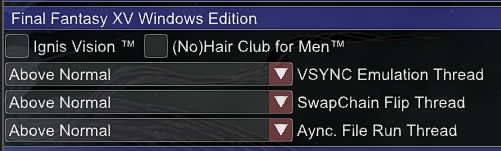
- Open the Special K menu with Ctrl + ⇧ Shift + ← Backspace and locate the Final Fantasy XV Windows Edition section.
- Set all threads to
Above Normal
Input Management
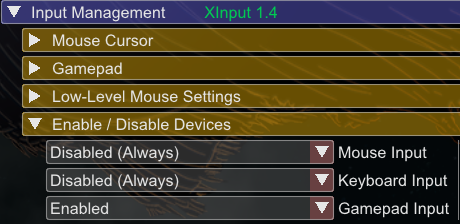
Fix potential hitching by disabling input devices not in use under Input Management -> Enable / Disable Devices
Game Settings
Nvidia Effects
Disable the 4 Nvidia in-game settings to avoid potential stutters:
| NVIDIA HairWorks | off |
| NVIDIA-VXAO | off |
| NVIDIA TurfEffects | off |
| NVIDIA ShadowLibs | off |
ReShade
If you want to get Final Fantasy XV working with both ReShade and Special K, check the ReShade entry for this game.
Steam Discussion
You can view the original Steam thread here: Special K FFXV Performance Fixes
Known Issues
Razer Synapse
The game might crash if you have Razer Synapse installed on your system.
Delete \steamapps\common\FINAL FANTASY XV\CTLEDMgr.dll as a workaround.