Streamline Compatibility
Usurp the usurpers!
Nvidia Streamline is an open-source solution for developers that simplifies integration of the latest upscaling/super resolution technologies from Nvidia and Intel by using a plug-and-play framework through a single integration with the game or application. Instead of implementing and integrating multiple different upscaling SDKs separately, game developers just need to integrate Streamline and then enable the different upscaling plug-ins as desired.
Depending on the version of Special K being used and depending on the sl.interposer.dll file or version of Streamline that is in the game's directory, one of the following incompatiblity messages or similar could appear when using Special K with global injection.
| Newer versions | Older versions |
|---|---|
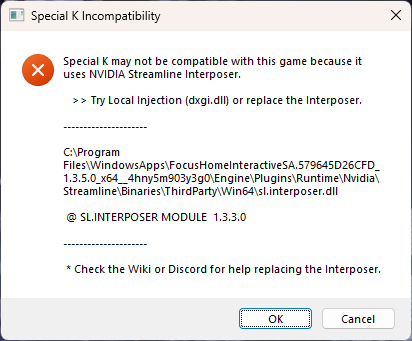 |
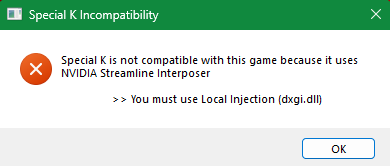 |
In some cases, the game may still launch with Special K after pressing the OK button. Alternatively, you could try a global injection delay or try Special K with local injection (either method could also get rid of the Special K Incompatibility pop-up message). However, while the game may still launch with Special K in some cases using global or local injection, replacing the game's Streamline interposer file might be needed for Special K's scRGB HDR to work.
Replacing the Streamline interposer
Keep in mind that replacing the interposer file could cause the game to lose features (DLSS Frame Generation is typically the only feature that becomes unavailable).
Do not replace the interposer file for the game
Diablo 4(or otherBattle.netgames). Their launcher checks for modified files. If the launcher repeatedly patches a dll such as Streamline or DLSS, it can flag you as modifying the game and result in a ban from the game.
Replacing the Streamline interposer file that comes with the game is another approach to make Special K compatible with a game that uses Streamline, and this approach can also make Special K's scRGB HDR work with the game. This is possible using a modified Streamline interposer file that Kaldaien has built from Nvidia's Streamline source. See steps below:
- Find the
sl.interposer.dllin the game's directory.
- The Special K Incompatiblity pop-up message when using Special K with global injection may list the exact location of the game's
sl.interposer.dll— Otherwise, search in the game's folders. - You can also copy the message of the Special K Incompatibility pop-up message to your clipboard with Ctrl + C.
- After finding the
sl.interposer.dllin the game's directory, copy and paste thatsl.interposer.dllsomewhere else as a backup.
-
Download the SK_Streamline-2_0_0.7z archive.
-
Extract the
sl.interposer.dllfrom theSK_Streamline-2_0_0.7zarchive. -
Replace the
sl.interposer.dllin the game's directory with the one extracted from theSK_Streamline-2_0_0.7zarchive.
-
Replacing the sl.interposer.dll gets rid of the Special K Incompatibility pop-up message if Special K detects that the interposer file is a compatible version (also requires a Special K version from February 8 2023 or newer).
-
If the sl.interposer.dll 2.0.0.0 does not work with the game, try with the sl.interposer.dll 1.1.1.0 linked under the Streamline interposer versions section.
-
The Special K Incompatibility pop-up message doesn't show up when using Special K with local injection; however, the game might only work with Special K when using global injection.
Streamline interposer versions
Below is a list of Streamline interposer versions (the numbers correspond to product versions).
| sl.interposer.dll 2.0.0.0 | modified version by Kaldaien available |
| sl.interposer.dll 1.4.8.0 | |
| sl.interposer.dll 1.3.3.0 | |
| sl.interposer.dll 1.2.0.0 | |
| sl.interposer.dll 1.1.1.0 | modified version by Kaldaien available |
Nvidia's Streamline github:
https://github.com/NVIDIAGameWorks/Streamline